Dental insurance breakdown form, blank and completed
Dental Revenue Desk publishes a blank worksheet derived from its 30-field scope and a benefits-breakdown illustration filled with synthetic data. They help a buyer inspect the published scope; neither is a committed live report, verification record, exception schema, or practice-management-system layout.
Published July 21, 2026
Synthetic data notice: every value on this page — patient, plan, group number, and all benefit figures — is fabricated for demonstration. No real patient or carrier appears on this page.
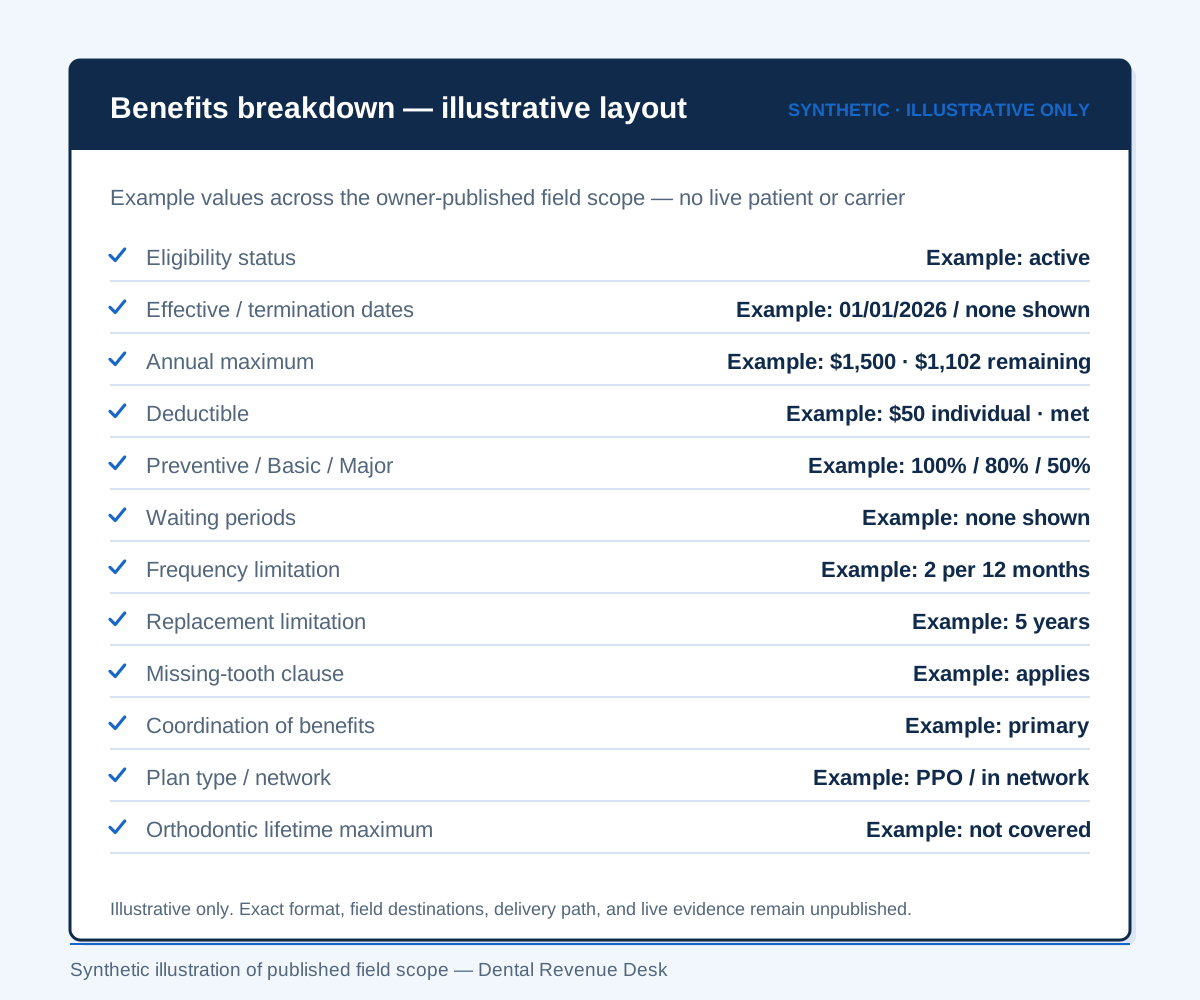
A synthetic benefits-breakdown illustration
Dental Revenue Desk’s owner-approved scope covers every scheduled insured patient, a 30-field benefits breakdown, a 3–5-day completion target, and owner-authorized write-back into the client practice management system. The example below visualizes that scope; it does not reproduce an operating record or prove a system-specific destination.
Every patient, plan, group number, status, amount, percentage, limitation, and outcome in the illustration is invented. The field categories come from the published 30-field scope behind this illustration.
- Patient
- Jane Sample (subscriber)
- Carrier / plan
- Sample Dental PPO — Group #00000
- Appointment
- Verified 4 days ahead
- Eligibility status
- Active · eff. 01/01/2026
- Annual maximum
- $1,500 · $1,102 remaining
- Deductible
- $50 · met
- Preventive / Basic / Major
- 100% / 80% / 50%
- Waiting periods
- None on file
- Frequency — prophylaxis
- Illustrative plan limit
- Frequency — bitewings
- Illustrative plan limit
- Missing-tooth clause
- Applies — documented
- Coordination of benefits
- Primary (birthday rule)
- Ortho lifetime maximum
- Not covered under plan
Every value above is synthetic. Dental Revenue Desk offers owner-authorized write-back; the system-specific delivery path is not publicly specified.
A blank worksheet derived from the published scope
The printable worksheet organizes Dental Revenue Desk’s owner-approved fields into six groups and leaves the values empty. It is an ungated buyer aid, not a claim about the company’s internal tool, live report format, completion log, or exception schema.
No published American Dental Association standard defines what a benefits breakdown must contain. The closest authoritative list is the ADA's predetermination return list: "patient's eligibility", "covered services", "benefit amounts payable", "application of appropriate deductible" and "co-payment and/or maximum limitation" (ADA, "Dental Benefits: An Introduction", undated; retrieved 21 July 2026). Dental Revenue Desk’s own published scope names related fields and additional plan provisions; this worksheet does not claim ADA endorsement.
| Field group | Published scope fields | Verified value |
|---|---|---|
| Patient and plan identity | Patient · subscriber and relationship · member ID · group number · carrier · plan type · network status | |
| Eligibility and dates | Active status · effective date · termination date on file · plan year or calendar year | |
| Money limits | Annual maximum and remaining · deductible, met and remaining · family deductible · copay and coinsurance amounts | |
| Category coverage | Preventive · basic · major · orthodontic lifetime maximum | |
| Plan provisions and limitations | Waiting periods · age limits · frequency limitations · replacement limitations · missing-tooth clause · treatment history where available · alternate benefit or LEAT · downgrades · bundling and downcoding · non-covered services | |
| Coordination of benefits | Other coverage on file · primary vs secondary ordering · coordination-of-benefits method |
The ADA advises that documenting interactions with the payer may help in a later dispute (ADA, "Eligibility Verification", undated; retrieved 21 July 2026). A buyer should confirm which verification-record fields Dental Revenue Desk will preserve. Useful candidates include:
- Date and time verified
- Method — carrier portal or call
- Representative name, where verified by call
- Reference or confirmation number
- The person or system that completed the verification
Dental Revenue Desk has not yet published a final completion-log schema, persistence rule, retention period, or client-audit view. The list above is an evidence-backed documentation checklist, not a claim that each item is implemented today.
Dental Revenue Desk publishes the worksheet as a single printable file —open the blank dental insurance breakdown form to print. It is ungated: no email address, no account, and nothing to fill in before it opens.
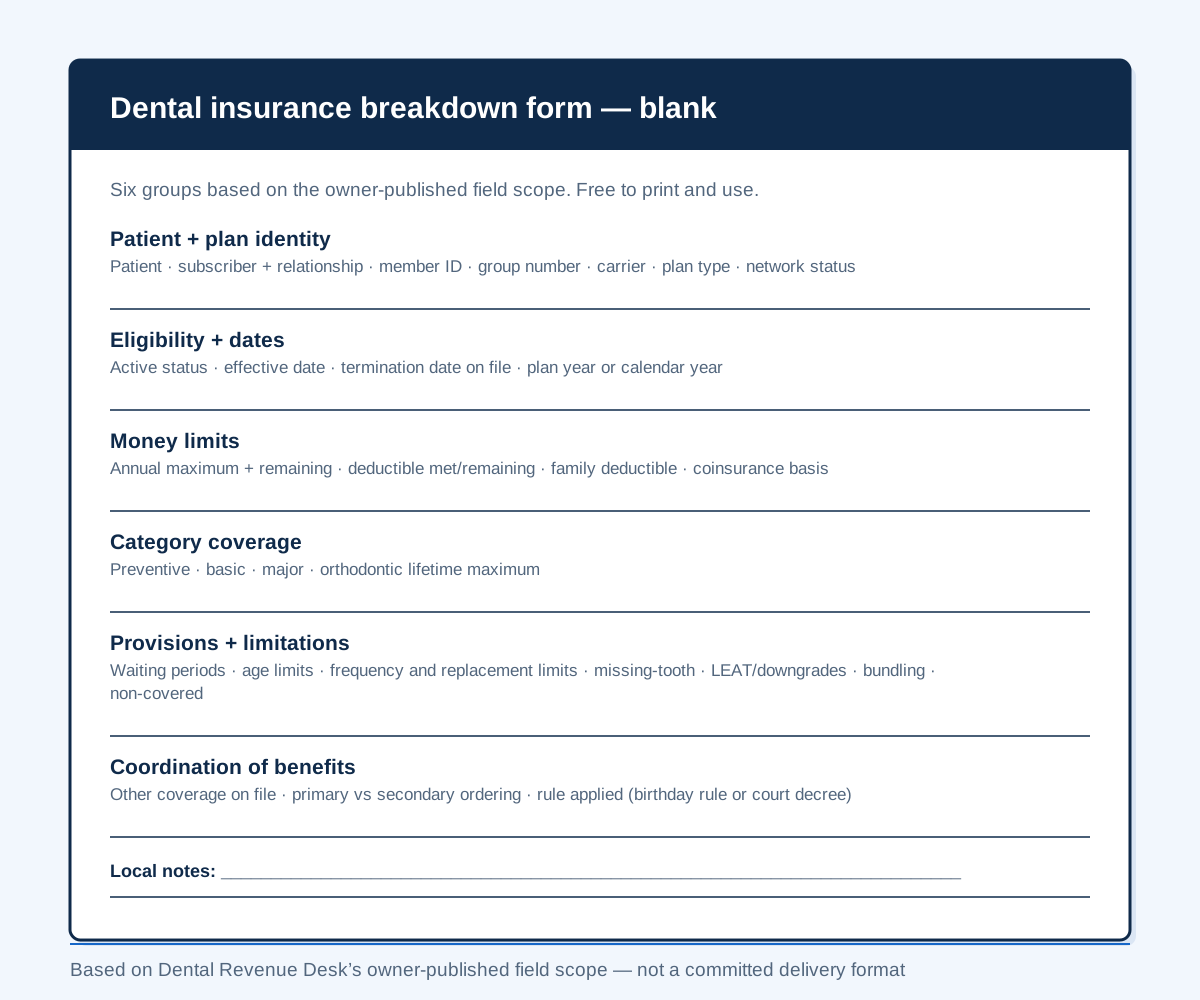
The blank worksheet carries no patient information. Dental Revenue Desk’s owner states that a business associate agreement will be signed before any PHI access; review the policy, evidence boundary, and remaining pre-PHI gates.
The owner-defined target workflow and open details
The owner has approved seven workflow labels. They describe the intended operating path, not an audited live SOP or proof that any particular method, schema, control, or result exists.
- Schedule pull. The source, access method, cadence, cutoff, reconciliation, and failure handling are not published.
- Portal or carrier verification. Source priority, contact channel, retries, authentication, evidence captured, and unavailable-source handling are not published.
- Full benefits breakdown. The 30 fields are published. Returned information can vary; required-source, notation, and completeness rules are not.
- Owner-authorized write-back. Dentrix, Open Dental, Eaglesoft, or the client system are in scope. Mechanism, account model, access level, and field destinations are not.
- Exception queue. The report label is approved. Triggers, categories, fields, statuses, recipients, timing, decision authority, escalation, and closure are not.
- QA review. Checks, acceptance criteria, reviewer role, sampling, correction, evidence, and performance measures are not published.
- Completion log. Schema, system of record, persistence, retention, client visibility, audit access, and correction history are not published.
Require a reviewed operating procedure, responsibility matrix, and evidence for those open details before live use. See the target workflow, timing terms, and current evidence boundary.
How to read the synthetic illustration
The illustration groups fictional values in one possible reading order. Dental Revenue Desk has not published a committed live layout, ordering rule, or practice-management-system destination for any individual field.
- Header. Fictional patient, subscriber relationship, plan and group identifiers, plus “Verified 4 days ahead” as an illustration inside the owner-approved 3–5-day target.
- Eligibility. A synthetic active status and effective date demonstrate two fields in the published scope; they do not represent a real payer response.
- Money limits. Fictional annual-maximum and deductible values demonstrate the corresponding fields, not an estimate or payment outcome.
- Category coverage. Fictional preventive, basic, and major percentages show one possible presentation of those published fields.
- Limitations and clauses. The illustration groups waiting periods, frequency limitations, and clause fields. As context, the American Dental Association notes that "many plans will only pay for one full mouth series of radiographs in a five-year period" — and a documented missing-tooth clause is, in the same ADA publication, a pre-existing-condition exclusion covering "dental conditions present before an individual's enrollment in the plan, such as missing teeth" ("Dental Benefits: An Introduction", undated; retrieved 21 July 2026).
- Coordination of benefits. The fictional sample reads “Primary (birthday rule)” to illustrate this field category. The ADA describes that protocol as "the parent whose birthday is earlier in the calendar year is primary", with a court decree taking precedence for divorced or separated parents (ADA, "Dental Plans: Coordination of Benefits", undated; retrieved 21 July 2026).
- Delivery boundary. The illustration does not establish a live write-back destination, exception status, QA result, or completion-log record.
Annual maximums, deductibles, category coverage, and plan limitations can inform a practice’s estimate, but verification is not a payment guarantee and this illustration does not compute or promise a patient portion.
Two of the fields read in that order have explainers of their own: how to evaluate frequency limits, age limits and replacement intervals, and which plan pays first when a patient carries two.
The exception-report label and its evidence boundary
Dental Revenue Desk’s owner-approved workflow includes an exception report for anything requiring attention. The public source does not define the trigger, categories, fields, statuses, timing, delivery, recipients, handling, decision authority, persistence, or resolution terms.
| Published field area | What the owner-approved source establishes | What remains open |
|---|---|---|
| Alternate benefit / LEAT | Alternate-benefit and downgrade provisions are named in the 30-field scope. | Trigger, record fields, resolution authority, timing, and closure evidence are not published. |
| Coordination of benefits | Primary/secondary ordering and coordination method are named in the scope. | Required evidence, exception category, decision owner, escalation, and status model are not published. |
| Frequency limitation | Frequency limitations and treatment history where available are named in the scope. | Lookup method, missing-history notation, routing, recipients, persistence, and resolution terms are not published. |
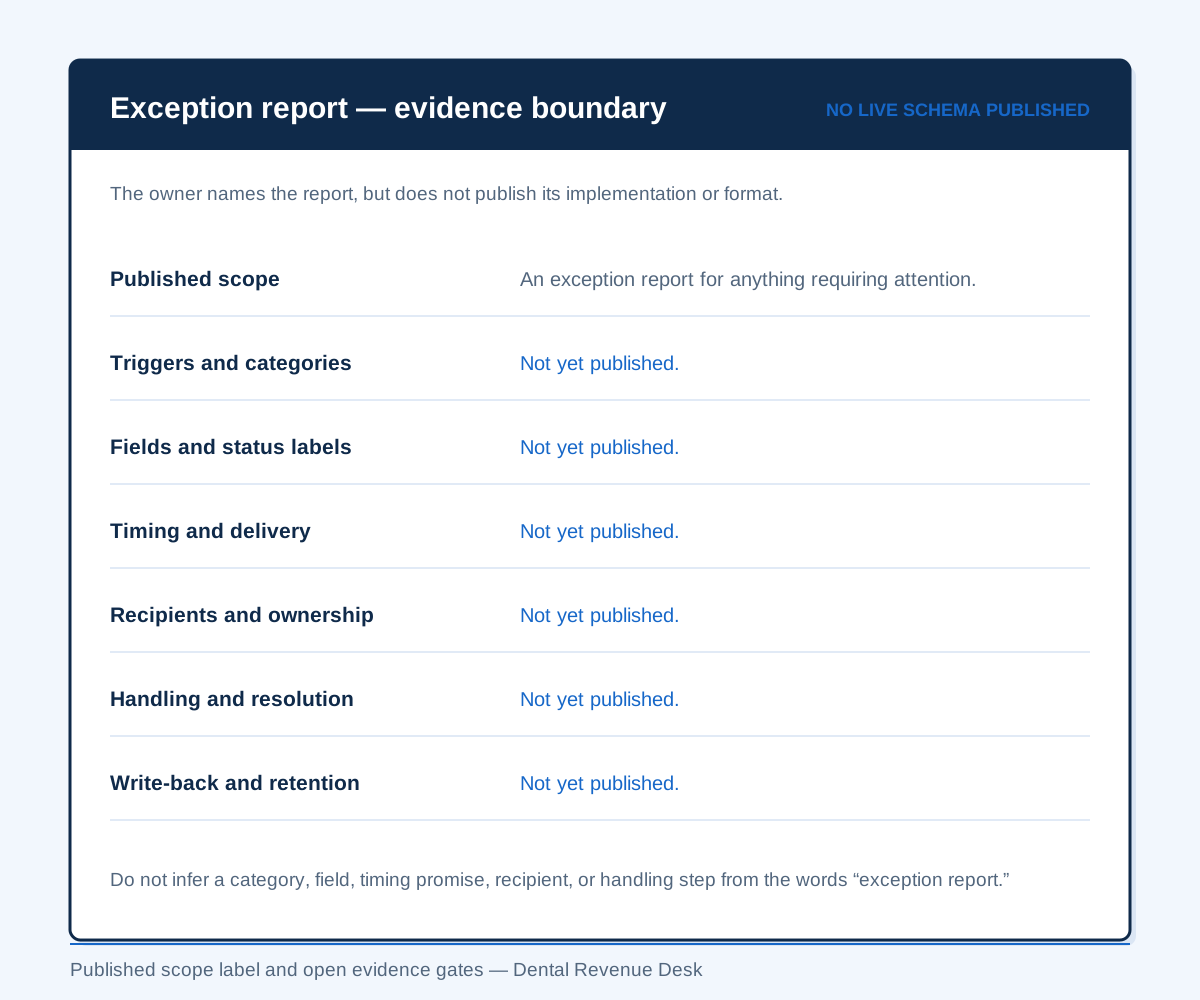
The table and figure are evidence-boundary illustrations, not sample patient records and not a committed production schema. Require the exact report, responsibility matrix, escalation path, storage terms, and acceptance criteria before live use.
Alternate-benefit provisions illustrate why the open method matters. The American Dental Association describes a case in which a posterior composite can be reimbursed at the alternate amalgam amount (ADA, "Least Expensive Alternative Treatment Clause", undated; retrieved 21 July 2026). Dental Revenue Desk names alternate-benefit and downgrade provisions in its scope, but has not published how findings are represented or routed: what an alternate benefit or LEAT provision does to a posterior composite.
QA review and a completion log are also owner-approved workflow labels. Checks, acceptance criteria, reviewer role, log schema, retention, client visibility, and audit evidence are not published. See the complete target-workflow evidence boundary.
No verification is a payment guarantee. The Centers for Medicare & Medicaid Services likewise explains that an eligibility response does not guarantee later reimbursement (CMS, Operating Rules FAQs, last modified 10 September 2024). Final adjudication rests with the payer.
The published write-back scope and evidence boundary
Dental Revenue Desk offers owner-authorized write-back of the finished breakdown into Dentrix, Open Dental, Eaglesoft, or the client practice management system. That generic promise is tied to the 30-field verification scope; it does not establish a field-level map, live report format, or exception-record destination.
The public evidence does not establish whether a benefit value becomes a calculated field, a note, a document, or another destination in any named system. It also does not establish the operating mechanism, account model, access level, or attachment behavior. Validate those details for the practice’s software before live use; do not infer them from this synthetic sample.
The software vendors’ own documentation and the limits of the current Dental Revenue Desk claim are set out in write-back in Dentrix, Open Dental, and Eaglesoft. Plan-by-plan inclusions and commercial boundaries remain unpublished —review the published starting bands and open terms.
Frequently asked questions
Is this a real patient’s benefits breakdown?
No. The patient, group number, plan, and benefit values on this page are fictional, and “Sample Dental PPO” is not a real carrier.
Do breakdowns arrive as PDFs or email attachments?
Dental Revenue Desk’s published core deliverable is owner-authorized write-back of the completed breakdown into Dentrix, Open Dental, Eaglesoft, or the client practice management system, with unresolved items flagged. The site does not currently publish a separate PDF, email, or other delivery-channel commitment.
Does every insured patient on the schedule get the full breakdown?
Every scheduled insured patient is in the owner-approved 30-field verification scope. Returned information can vary by payer and plan; notation for unavailable or not-applicable fields and the exact exception trigger are not published.
How far ahead is the breakdown finished?
Dental Revenue Desk publishes a target of completing verification 3–5 days before the appointment and an urgent same-day add-on at $10–$15 per verification. The American Dental Association advises offices to verify eligibility on the date of service; Dental Revenue Desk has not published who owns that recheck or how it is performed.
Can we see breakdowns for our own patients first?
The owner offers a pilot only after an agreement and business associate agreement are signed. The owner states that the BAA comes before any PHI access, including a pilot; the signing entity plus legal, security, access, and operating review remain pre-PHI gates.
Is the blank dental insurance breakdown form free to use?
Yes — Dental Revenue Desk publishes the blank dental insurance breakdown form ungated: no email address, no download, no account. It is plain HTML, so your insurance coordinator can print it or copy the field groups into your existing sheet.
Is there an ADA-standard dental insurance verification form?
Dental Revenue Desk does not represent this worksheet as an ADA standard or as its committed live format. It is an illustrative layout derived from the owner-approved 30-field scope, with cited ADA guidance used only for context.
See how verification would run in your practice
A 20-minute workflow review: we map your current verification process, show you the breakdown we deliver, and confirm your software and volume. No commitment, no patient information.